

Sunday, 26 February 2012
AppleStation iPhone Tool
0Include Inside:
f0recast-v1.3.exe
greenpois0n.exe
iDetector-v1.0.1.exe
iFaith-v1.4.2.exe
iFirmware Downloader 1.0.exe
iFunBox.exe
iPhone Checker.exe
iREB-r5.exe
iSpirit.exe
iTools.exe
sn0wbreeze-2.1.exe
sn0wbreeze-v2.9.1.exe
tinyumbrella-5.10.06.exe
ToolJail_2.2.exe
redsn0w_win_0.9.4
redsn0w_win_0.9.6b5
redsn0w_win_0.9.6rc9
redsn0w_win_0.9.10b5c


Download Link : AppleStation.com
For confirmation on your account check in email or spam mail.


LG Optimus Q LU2300 hard reset Procedures
0Here's the step by step instruction on how to Hard Reset the LG Optimus Q LU2300, to restore its original factory default settings.
Note: Performing a hard reset is only applicable if your LG Optimus Q LU2300 experiencing a hang-up, unresponsive or frozen when opening or using some application installed.
Here's the following procedures:
Note: Performing a hard reset is only applicable if your LG Optimus Q LU2300 experiencing a hang-up, unresponsive or frozen when opening or using some application installed.
Here's the following procedures:

LG Optimus Q LU2300 Soft Reset/Factory Reset on Menu Settings
1. On main home screen, select Menu
2. Select Settings, then Privacy
3. Select Factory Data Reset
4. Select Reset phone
5. Just enter the Password if prompted, then confirm by selecting Erase Everything
If your LG Optimus Q LU2300 is frozen, hang-up or unresponsive,
1. Turn it off, remove the battery out and reinsert it back again
2. Hold the Home and Volume Down button
3. Press and hold the Power button until it turns on again
4. Just follow the on-screen procedures to reset the LG Optimus Q LU2300
Once the restoring process completes, the LG Optimus Q LU2300 will then reboot, and then it will restore back to its original default state setting again like when you bought it way back then.
How to Factory Reset the Contents and Settings on Apple iPad 2
0Here's how to Factory Reset the Settings or Erase the Contents on Apple iPad 2 after installing and removing many applications and you want it restore back to its original settings.

1. On the Apple iPad 2 home screen, select the Settings icon
2. Select General in the menu to the left of the screen, then tap Reset
3. The two options shows:
1. "Reset All Settings" will restore all of your app settings to their original status
2. "Erase All Content and Settings" will reset all app settings and erase all of your data (photos, apps, bookmarks, music, etc.)
4. The iPad 2 will then reboot after selecting one of the two options above,
5. If you selected "Erase All Content and Settings", you will need to reconnect your iPad 2 to iTunes in order to reactivate it
2. Select General in the menu to the left of the screen, then tap Reset
3. The two options shows:
1. "Reset All Settings" will restore all of your app settings to their original status
2. "Erase All Content and Settings" will reset all app settings and erase all of your data (photos, apps, bookmarks, music, etc.)
4. The iPad 2 will then reboot after selecting one of the two options above,
5. If you selected "Erase All Content and Settings", you will need to reconnect your iPad 2 to iTunes in order to reactivate it
Blackberry curve 8520 stuck in headset activated mode when making a call solution
0Here's a solution for blackberry curve 8520 that the headset shows or in activated mode when making a call or someone calling the unto the device.
If trying to fix this problem do this some simple steps below:
1. Try to upgrade or update the blackberry 8520 firmware.
2. Pull the battery out and reinsert it back again in a few seconds.
If the above doesn't' work, you may then proceed to hardware troubleshooting.
The solution below shows a certain components that needs to be check.
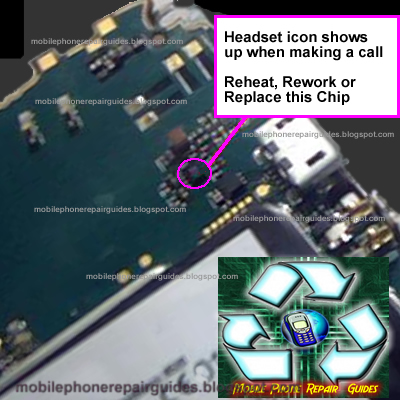
You may first try to clean the headset jack, then reheat, rework or replace the chip shown on the solution above if the problem still occurs.
If trying to fix this problem do this some simple steps below:
1. Try to upgrade or update the blackberry 8520 firmware.
2. Pull the battery out and reinsert it back again in a few seconds.
If the above doesn't' work, you may then proceed to hardware troubleshooting.
The solution below shows a certain components that needs to be check.
Blackberry Curve 8520 headset activated mode solution
You may first try to clean the headset jack, then reheat, rework or replace the chip shown on the solution above if the problem still occurs.
Blackberry bold 9700 Earpiece Speaker Problem Repair Solution
0Just refer to the solution below and locate the highlighted components. Then visually check it, do a re-hot, re-solder or replacement when necessary.

0
Read more
Here's a step by step guide and a solution to fix Blackberry bold 9700 white screen problem, many users called it a White Screen of Death(WSOD. This solution may help if having a problem issue like below.
Here's what your Blackberry Situation that may possibly fix this solution:
The phone hasn't been anywhere close to water and the moisture stickers are intact. Can still hear tones from incoming call or text messages.
Other than the display screen the phone is fully operational. Dm sees it perfectly, You can still do a blind-call out and receive calls. Only problem is i can only see a bright white screen.
Many sites has been suggesting a solution such as this: Battery pull, wipe, reinstall 4.6, reinstall 5, backup and restore files, clean install, battery left out for 24 hours and installed a new battery but it doesn't fix the problem.
Now, heres' a solution on how to fix a a Blackberry Bold 9700 with white screen problem.
1. Reassemble the Blackberry bold 9700, only do it unless the warranty period has already expired.
Now, locate the highlighted components as shown on the image. These are the display filters. Works as electrostatic discharge (ESD) and electromagnetic Interference (EMI) filters, and once being damaged it will cause and result to a white screen, sometimes being garbled or saturated screen display.
Check those components and have it replaced, you may find these parts from any old Blackberry phone PCB board that are already junked. Just like the one below that taken apart from the damaged Blackberry 9100 PCB board.

Then in place it to your Blackberry bold 9700 display filters. Try replacing one by one then power it again to check, just repeat until all four filters being replace and get the screen display fix.
 That's it! all credits goes to Rievax_08 and GSM Solido for the repair tricks. Happy fixing hope this helps.
 |
| The Blackberry Bold 9700 showing a bright white screen display |
The phone hasn't been anywhere close to water and the moisture stickers are intact. Can still hear tones from incoming call or text messages.
Other than the display screen the phone is fully operational. Dm sees it perfectly, You can still do a blind-call out and receive calls. Only problem is i can only see a bright white screen.
Many sites has been suggesting a solution such as this: Battery pull, wipe, reinstall 4.6, reinstall 5, backup and restore files, clean install, battery left out for 24 hours and installed a new battery but it doesn't fix the problem.
Now, heres' a solution on how to fix a a Blackberry Bold 9700 with white screen problem.
1. Reassemble the Blackberry bold 9700, only do it unless the warranty period has already expired.
Now, locate the highlighted components as shown on the image. These are the display filters. Works as electrostatic discharge (ESD) and electromagnetic Interference (EMI) filters, and once being damaged it will cause and result to a white screen, sometimes being garbled or saturated screen display.
 |
| Blackberry Bold Display Filters Components |
Check those components and have it replaced, you may find these parts from any old Blackberry phone PCB board that are already junked. Just like the one below that taken apart from the damaged Blackberry 9100 PCB board.
Then in place it to your Blackberry bold 9700 display filters. Try replacing one by one then power it again to check, just repeat until all four filters being replace and get the screen display fix.


Latest firmwares GT-S5830i,GT-S5570,GT-S5250,GT-P7500
0Model PDA Version Date CSC Country/Carrier Download link Kies -
GT-S5830i S5830IXXLA4 2012 February S5830IODDLA1 Nepal Download -
GT-S5830i S5830IXXLA4 2012 February S5830IODDLA1 India Download -
GT-S5570 S5570XWKTH 2012 February S5570OXXKT9 Poland Download -
GT-S5250 S5250AIKJ1 * 2011 November S5250TIMKJ1 Italy (TIM) Download -
GT-P7500 P7500XWLB1 2012 February P7500NSELA1 Sweden (Telia) Download

S8530XXLA1 Bada 2.0 Upgrade for Samsung Wave II S8530 newest update 2012
0The new firmware with build number S8530XXLA1 (CSC: S8530OXALA1). SamFirmware has just put online a new firmware: S8530XXLA1 (CSC S8530OXDLA1). This is officially released in Italy by Samsung Kies firmware server, an upgrade from previous firmware version S8530XXKF1. it does not only support Italian language but contains all European languages like English, German, Danish, Polski and etc. This firmware build is more stabler than the previous released. All the applications are working great. Social-hub applications, Chat On, Facebook, Dolphin browser, Allshare are working very smoothly.
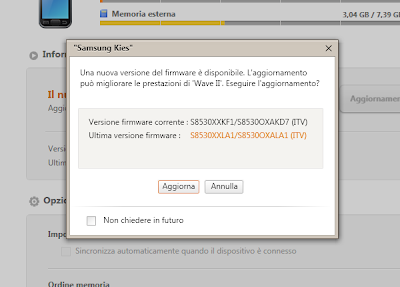
Download the firmware S8530XXLA1. As always flash at your own risk!
S8530XXLA1_S8530OXALA1_ITV
The password to unzip is "samfirmware.com".
How to install and flash:
Download the firmware S8530XXLA1. As always flash at your own risk!
S8530XXLA1_S8530OXALA1_ITV
The password to unzip is "samfirmware.com".
How to install and flash:
USB driver
Multiloader v 5.65
BADA 2.0 firmware from samfirmware.com links
S8530XPKH1 http://hotfile.com/dl/126043817/738c80f/S8530XPKH1.rar.html
Password is samfirmware.com
Flashing Bada 2.0 OS on Samsung Wave II S8530
You have to flash it as a "full-firmware" and with bootfiles.
Also, keep in mind that you have to set debug level to low and then you can fully use your bada 2.0 beta version. Even turning the phone off will not crash it.
Just type *#33284*# and debug level to LOW, on BADA 2.0 flashed phone and enjoy the Difference.
Troubleshooting hints if errors may happens while flashing.
Only one thing important, when I flash, after the Bootfiles, i've got a serial port error. So I just unplug/plug my Wave to another USB port, and restart Multiloader (et restart the flash without the bootfiles, because they've already been flashed).
- shutdown while in progress => reason is battery low level => charge it then try once more
- phone can't go pass sim loading in booting progress => may be by CSC was not config, may be by flashing improper (ex. choosing wrong file wrong places)
- Try to reboot without sim card inside the phone. If pass, keyin code *#5239870*# , select line 2 , keyin pass *#27236#* and select proper csc region for ur phone.
- Some times phone can be login without sim (while with sim impos.bl) if wrong csc.
Also, keep in mind that you have to set debug level to low and then you can fully use your bada 2.0 beta version. Even turning the phone off will not crash it.
Just type *#33284*# and debug level to LOW, on BADA 2.0 flashed phone and enjoy the Difference.
Troubleshooting hints if errors may happens while flashing.
Only one thing important, when I flash, after the Bootfiles, i've got a serial port error. So I just unplug/plug my Wave to another USB port, and restart Multiloader (et restart the flash without the bootfiles, because they've already been flashed).
- shutdown while in progress => reason is battery low level => charge it then try once more
- phone can't go pass sim loading in booting progress => may be by CSC was not config, may be by flashing improper (ex. choosing wrong file wrong places)
- Try to reboot without sim card inside the phone. If pass, keyin code *#5239870*# , select line 2 , keyin pass *#27236#* and select proper csc region for ur phone.
- Some times phone can be login without sim (while with sim impos.bl) if wrong csc.
Samsung I5500 Galaxy 5 Service manual/Schematic Diagram
0Here's the Samsung Galaxy 5 I5500 Service manual download links we spotted on the net, Also known as Samsung i5500 Corby Smartphone, Samsung Galaxy Europa, Samsung Galaxy 550 with Android OS version, v2.1 (Eclair), upgradable to v2.2. This repair manual includes the following files listed below:

Disassembly and Reassembly Manual, Product Specification, Exploded View, Electrical parts & Parts list PCB board layout and Schematic diagram.
This also includes the Samsung I5500 Galaxy 5 Repair Guides and Troubleshooting for the following problems like:
* LCD Display problem - Abnormal Display
* Touch Screen Problem - Touch Screen Not Working
* Power ON problem- Power On does not work
* Initial Failure problem - Hang, frozen and restart
* Not Charging Problem - Abnormal charging
* Sim Card problem - insert sim card error, sim card not detected or recognize
* Micophone Problem - No voice call sound transmit
* Speaker problem - buzzer speaker malfunction
* Bluetooth and WiFi problem -Bluetooth and Wifi operation failures
* Camera problem - Camera Function not working
* GSM network signal problem - No Signal on GSM network
* WCDMA network signal problem - No signal on WCDMA network
Samsung I5500 Galaxy 5 / GT-I5500B / Corby Smartphone / Galaxy 550 service manuals, assembly - disassembly instructions, troubleshooting guide and schematics downloads
Heardsolution.blogspot.com
Heardsolution.blogspot.com 2
Heardsolution.blogspot.com 3
Heardsolution.blogspot.com 4
Samsung I6220 Star TV Service manual , Schematic and Disassembly
0This is the service manual the Samsung I6220 Star TV Repair Guides and Troubleshooting for the following problems like:

* Software Downloading - Firmware programming
* Touch Screen Problem - Touch Screen Not Working
* Not Charging Problem - Abnormal charging
* Power ON problem- Power On does not work
* Initial Failure problem - Hang, frozen and restart
* LCD Display problem - Abnormal Display
* Micophone Problem - No voice call sound transmit
* Camera problem - Camera Function not working
* Speaker problem - buzzer speaker malfunction
* Sim Card problem - insert sim card error, sim card not detected or recognize
* Bluetooth and WiFi problem -Bluetooth and Wifi operation failures
* GSM network signal problem - No Signal on GSM network
* WCDMA network signal problem - No signal on WCDMA network
The documents also attached are Disassembly and Reassembly Manual, Product Specification, Exploded View, Electrical parts, Parts list PCB board layout , Block and Schematic diagram.
Samsung I6220 Star TV service manuals, assembly - disassembly instructions, troubleshooting guide and schematics. Check the download links below:
Note: we only spotted this links, we do not host or upload the files.
1/Heardsolution.blogspot.com
2/Heardsolution.blogspot.com

Subscribe to:
Posts (Atom)


